

.png)
Key Takeaways
- Display size should be determined by the farthest viewer, not wall dimensions or budget
- A display that seems large up close often becomes inadequate at typical meeting room distances
- Content type matters because spreadsheets and text require larger displays than video
- The 4/6/8 rule provides a reliable starting point for sizing based on viewing distance
- Mounting height affects perceived size and viewing comfort
- Dual displays can solve problems that a single larger display cannot
1. Showroom Experience Misleads You
Showrooms display TVs at close range. You stand four to six feet away, evaluating picture quality and comparing models side by side. At that distance, a 65-inch display dominates your vision.
Conference rooms work differently. The typical seating distance in a 12-person room puts the farthest viewer 15 to 20 feet from the display. At that distance, the same 65-inch screen that seemed huge in the store becomes a modest rectangle on the wall.
The math explains why. Angular size, meaning how much of your field of view the display occupies, decreases rapidly with distance. Double the distance and the display appears one quarter the size. Triple it and the apparent size drops to one ninth.
A display that fills 30 degrees of your field of view at 6 feet fills only 10 degrees at 18 feet. That shift takes you from immersive to inadequate.
2. The 4/6/8 Rule for Quick Sizing
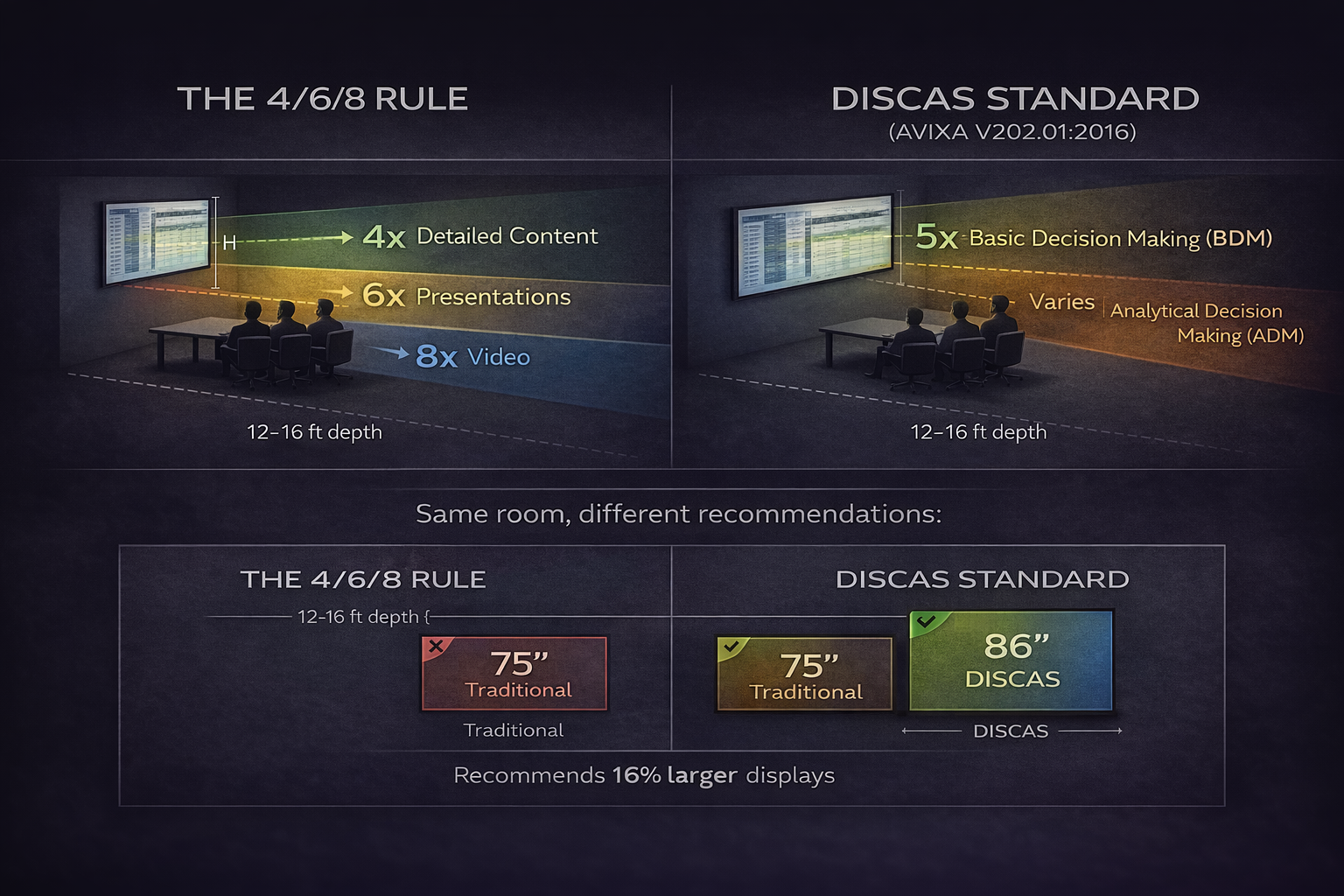
The audiovisual industry has long relied on a practical guideline known as the 4/6/8 rule. This rule uses display height as the basis for calculating maximum viewing distance, adjusted for the type of content being shown.
For detailed content like spreadsheets, text documents, and data visualizations, the farthest viewer should sit no more than 4 times the display height from the screen. For general content like presentations with mixed text and graphics, allow up to 6 times the display height. For basic content like video conferencing where faces are the primary focus, you can stretch to 8 times.
A 65-inch display has a height of approximately 32 inches. Using the 4x rule for detailed content, the maximum viewing distance is 128 inches, or about 10.5 feet. If your farthest seat is 16 feet from the display, you need something significantly larger.
Working backward from a 16-foot viewing distance and detailed content requirements, you would typically need a display height of 48 inches minimum. That translates to an 86 to 98-inch display depending on aspect ratio.
The DISCAS Standard
AVIXA, the Audiovisual and Integrated Experience Association, is the leading trade organization for the professional AV industry. In 2016, AVIXA published a more comprehensive sizing standard called DISCAS – Display Image Size for 2D Content in Audiovisual Systems (AVIXA V202.01:2016).
DISCAS builds on the 4/6/8 concept but factors in variables the older rule ignores: display resolution, content element size such as font size in presentations, and aspect ratio. The standard defines two viewing categories. Basic Decision Making applies to typical presentations where viewers need to understand information but not every fine detail. Analytical Decision Making applies when viewers must discern precise details, such as medical imaging, engineering drawings, or financial data with small text.
For most conference room applications using HD displays and standard presentation content, DISCAS recommends a multiplier of 5 rather than 6. This means displays should be approximately 16% larger than the traditional 4/6/8 rule suggests.
For that same 16-foot viewing distance, the traditional rule points to a 75-inch display. DISCAS calculations recommend 86 inches or larger. That difference often separates a room where people squint from one where content is effortlessly readable.
AVIXA provides free DISCAS calculators at avixa.org/standards/discas-calculators for precise sizing tailored to your specific room dimensions and content requirements.
3. How Content Type Changes Requirements
Not all meetings are the same. A room used primarily for video calls has different requirements than one used for financial reviews.
Video conferencing displays faces. Human eyes are remarkably good at reading facial expressions even at modest sizes. A display that works fine for video calls may fail completely when someone shares a spreadsheet with 10-point text.
Presentation slides vary widely. Some presenters use large fonts and minimal text. Others pack slides with data tables and small annotations. Designing for the worst case means assuming detailed content will appear regularly.
Screen sharing from laptops introduces another variable. Applications designed for personal screens assume the viewer sits two feet away. When that same interface gets shared to a room display viewed from 15 feet, interface elements become illegible.
If your room handles mixed use, size for the most demanding content type. A display that handles spreadsheets will handle everything else.
4. Room Depth and Seating Arrangement
The farthest viewer determines minimum display size. In a rectangular room with a standard conference table, this is usually someone at the opposite end from the display.
Measure from the display mounting position to the farthest seat. Not the wall. Not the table edge. The actual seat position where someone's eyes will be during a meeting.
Room depth is the primary driver, but width matters too. People seated at the sides of a long table view the display at an angle. This reduces effective size further because they see a foreshortened image. Wide tables push side seats into more extreme angles.
Some rooms have secondary seating along walls for overflow attendees. If these positions get used regularly, they become your farthest viewers and drive sizing requirements upward.
5. The Mounting Height Factor
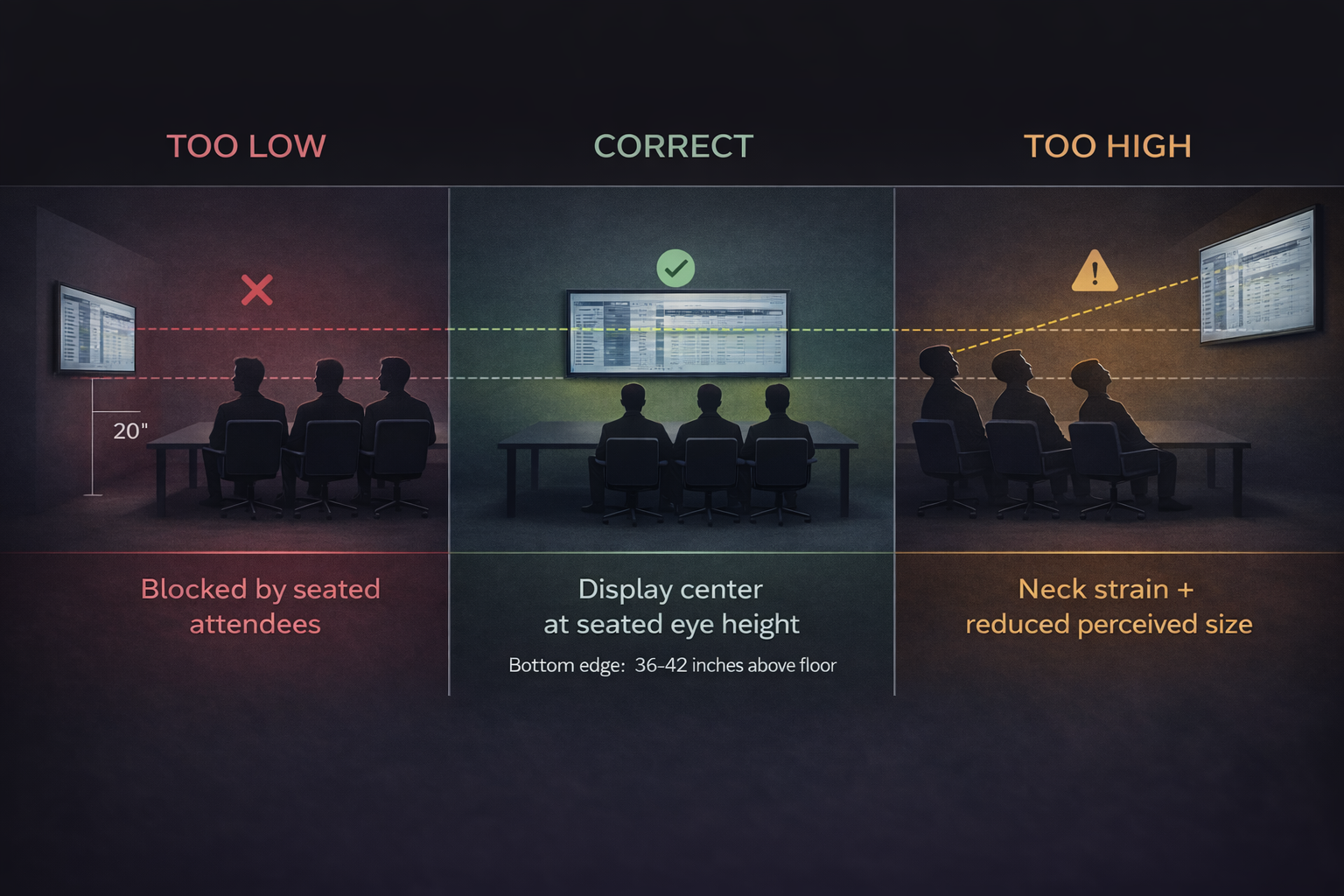
A display mounted too high forces viewers to look up, creating neck strain and reducing effective viewing size. A display mounted too low gets blocked by people seated between the viewer and the screen.
The general guideline puts the display center at seated eye height for the primary viewing positions. In practice, this means the bottom edge of the display sits 36 to 42 inches above the floor in most conference rooms.
Mounting height interacts with distance. A display mounted at the right height for viewers at the table may be awkwardly high for someone standing near the back of the room. If your room regularly hosts standing attendees, you may need to compromise on height or consider display placement that works for both scenarios.
Higher mounting positions also reduce perceived size. Looking up at a display makes it appear smaller than the same display at eye level. If constraints force higher mounting, compensate with a larger display.
6. When One Display Is Not Enough
Sometimes the right answer is not a bigger single display but multiple displays. This applies in several common situations.
Long narrow rooms put side viewers at extreme angles to a centered display. Two displays flanking a central position let each side of the table see one display at a reasonable angle.
Very deep rooms may require displays larger than practical single-unit sizes. Two 75-inch displays can provide better coverage than trying to source and mount a single 120-inch unit.
Rooms with multiple focal points, such as those designed for hybrid meetings where the camera faces the room and the display faces participants, benefit from displays at both ends so remote participants appear in front of those speaking to them.
Dual displays add cost and complexity. Content needs to be mirrored or split appropriately. Control systems need to manage both units. But in the right situations, two displays solve problems that no single display can address.
7. Common Room Types and Starting Points
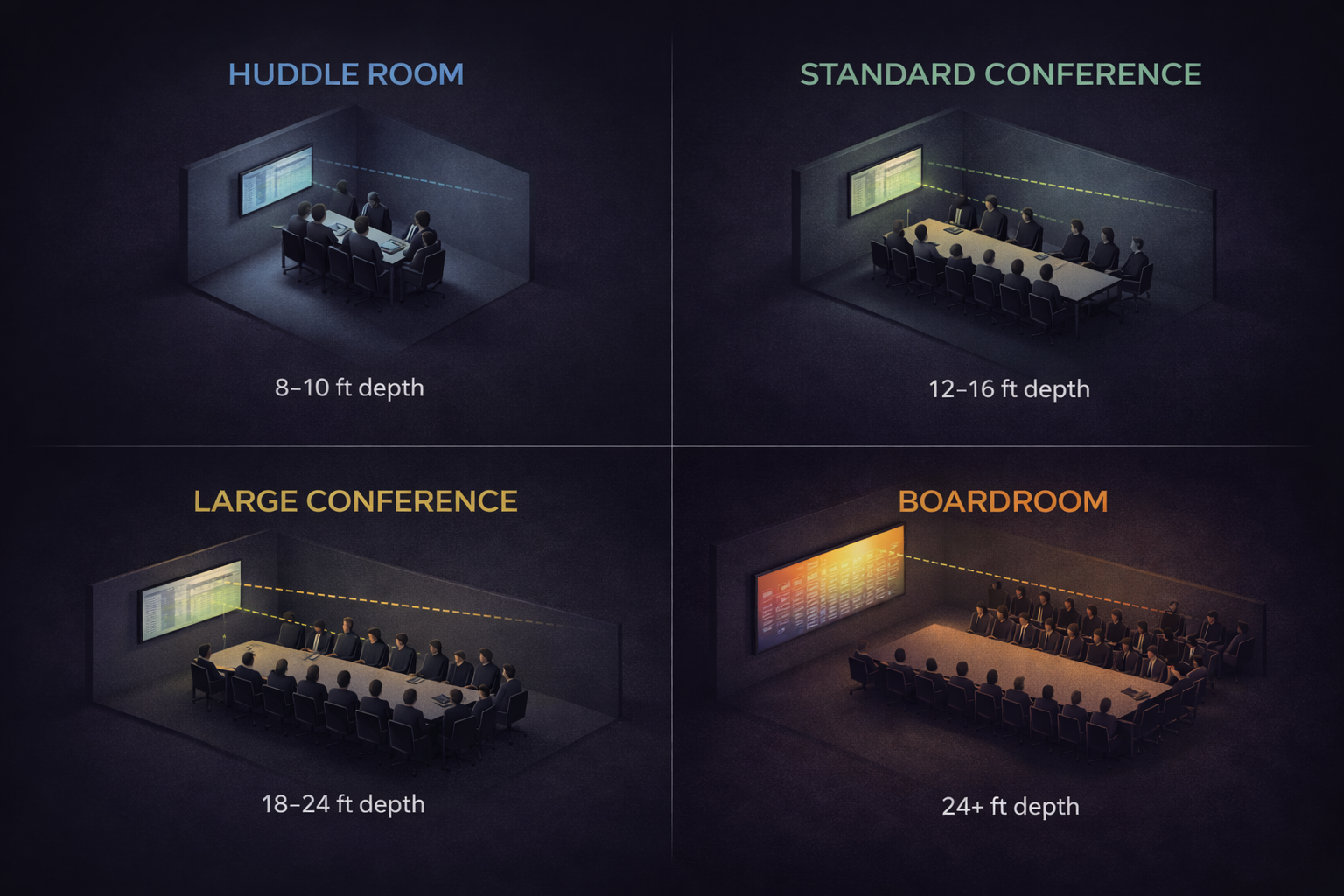
While every room differs, these ranges provide reasonable starting points based on typical configurations.
Huddle rooms with 4 to 6 seats and 8 to 10 feet of depth work well with 55 to 65-inch displays. The small space keeps everyone close enough that moderate sizes suffice.
Standard conference rooms with 8 to 12 seats and 12 to 16 feet of depth typically need 75 to 86-inch displays. This is where undersizing happens most often because 75 inches sounds large but often falls short.
Large conference rooms with 14 to 20 seats and 18 to 24 feet of depth require 86 to 98-inch displays or dual display configurations. Single displays smaller than 86 inches rarely work in these spaces.
Boardrooms and training rooms with 20 or more seats and depths exceeding 24 feet need 98-inch or larger displays, LED video walls, or projection systems. Flat panel displays reach practical limits in very large spaces.
8. The Replacement Cost of Getting It Wrong
Undersized displays create ongoing friction. Every meeting includes moments where people cannot see clearly. Presenters spend time adjusting content. Attendees miss information. The room works, but it works poorly.
Replacing an undersized display costs more than buying the right size initially. You pay for the original display, installation, and any wall modifications. Then you pay again for the replacement and its installation. The original display either gets relocated to a smaller room, sold at a loss, or discarded.
Beyond direct costs, there is opportunity cost. Meetings in an undersized room are less effective. Decisions get delayed because people cannot see the data clearly. Remote participants disengage because shared content is illegible on the room display.
Taking time to calculate the right size before purchasing prevents these compounding costs.
FAQs
How do I measure the farthest viewing distance in my room?
Measure from where the display will mount, specifically the center of the screen, to the seated eye position of the person in the farthest regular seat. Use the actual seat location, not the wall or table edge. If overflow seating along walls gets used regularly, measure to those positions instead.
Does 4K resolution mean I can use a smaller display?
Higher resolution allows finer detail at the same size, but it does not change the fundamental relationship between display size and viewing distance. A 4K display shows sharper text than a 1080p display of the same size, but if the display is too small, sharper text still cannot be read. Resolution helps, but size remains the primary factor.
What if my wall cannot accommodate the recommended display size?
If physical constraints limit display size, you have several options. Reconfigure seating to reduce maximum viewing distance. Use dual displays on adjacent walls. Consider a short-throw projector that creates a larger image from a closer position. Accept the limitation and design the room for content types that work at the available size.
Should I size for the content we use today or plan for future needs?
Size for the most demanding content you reasonably expect to display. Most organizations increase their use of detailed visual content over time. A display that barely works today will likely fall short in two years. Building in modest headroom costs less than premature replacement.
How do I convince leadership that we need a larger display than they expect?
Use AVIXA’s rules to show the math. Demonstrate with actual content at the proposed viewing distance. Point out rooms where undersized displays cause ongoing problems. Frame the cost as investment in meeting effectiveness rather than display specifications. Leaders who sit through meetings where they cannot see the screen often become advocates for proper sizing.
Get Display Sizing Right the First Time
Display size affects every meeting that happens in your conference rooms. Taking time to calculate requirements before purchasing prevents years of frustration and the cost of premature replacement.
If you are planning new meeting spaces or evaluating whether existing rooms are working as well as they should, we can help you determine the right specifications based on how your spaces will actually be used.

.png)
