

Key Takeaways
- Scheduling panels fail more often from poor deployment strategy than from technology issues
- Placement height, visibility, and proximity to the door directly impact whether people use them
- Calendar integration must be native and real-time, not delayed or requiring a separate app
- Proximity sensors that wake the screen on approach increase engagement significantly
- No-show policies enforced through the system prevent ghost bookings that frustrate teams
- On-the-spot booking from the panel itself is critical for walk-up usage
- Panels should display status visible from down the hallway, not just up close
1. Placement Determines Whether Anyone Looks at It
A scheduling panel mounted at the wrong height, on the wrong side of the door, or too close to the frame gets ignored. We see this constantly.
Best practices from our deployments:
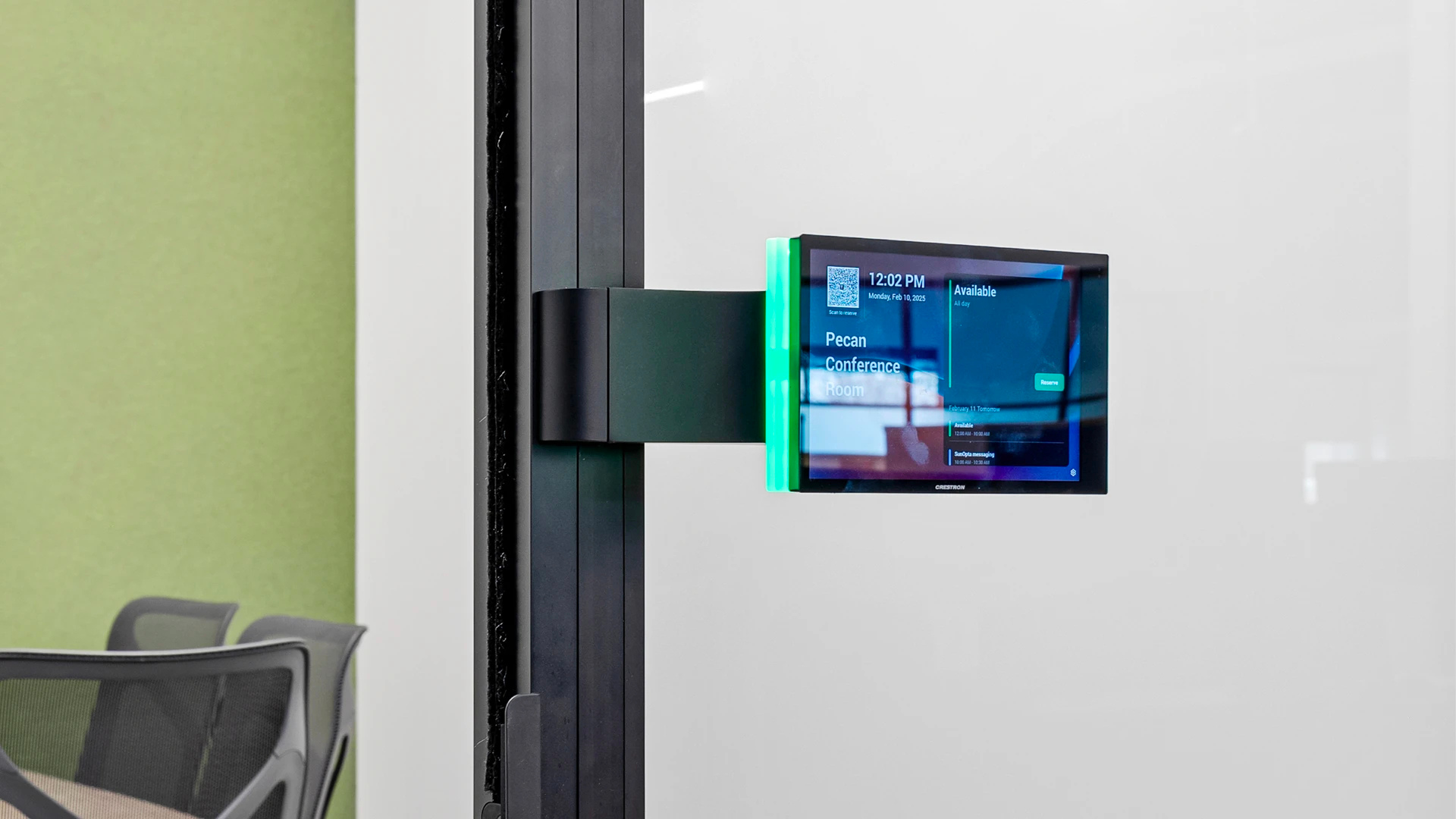
- Mount at eye level (48-52 inches center) on the latch side of the door
- Ensure visibility from the hallway approach, not just from directly in front of the room
- Use color-coded LED indicators (green/red) visible from 20+ feet away so people can see availability without walking up to read text
If someone has to stop, lean in, and read a screen to figure out if a room is free, the panel has already failed its primary job.
2. Calendar Integration Has to Be Instant
The panel must reflect the calendar in real time. A 5-minute sync delay creates double bookings. A 15-minute delay makes the panel useless.
Requirements for a working deployment:
- Native integration with your calendar platform (Exchange, Google Workspace, or both)
- Two-way sync so bookings made at the panel appear on the organizer's calendar immediately
- Automatic release if nobody checks in within a set window (typically 10-15 minutes)
That last point is the single biggest driver of utilization improvement. Ghost bookings, where someone reserves a room and never shows, are the number one complaint we hear from facilities teams. Auto-release solves it.
3. Proximity Sensors Change the Interaction
A dark screen on the wall looks like a dead device. People walk past it. A screen that wakes up as you approach invites interaction.
Proximity sensors that activate the display when someone is within 3-5 feet do two things:
- Signal that the panel is live and responsive
- Create a natural moment to check availability or book on the spot
We deploy panels with this feature on every project. Jamf, Inspire Sleep, and SunOpta all use room scheduling displays with proximity activation. It's a small detail that has an outsized effect on adoption.
4. On-the-Spot Booking Is Not Optional
If someone walks up to an available room and the panel only shows status but won't let them book it right there, they'll just walk in without booking. Now the room looks available to everyone else, and you're back to double bookings.
The panel must support:
- Instant booking from the touchscreen (tap to reserve for 15, 30, or 60 minutes)
- Extension of current meetings if the next slot is open
- Clear display of upcoming bookings so walk-up users know how long the room is free
This is the difference between a status display and a scheduling tool. Status displays inform. Scheduling tools change behavior.
5. No-Show Enforcement Is Where ROI Lives
The technology enables it. The policy enforces it. Both are required.
A typical no-show workflow:
- Meeting starts at 2:00 PM. Nobody checks in by 2:10 PM.
- The system releases the room and updates the calendar.
- An email goes to the organizer noting the room was released.
This sounds aggressive. It's not. It's the single most effective way to increase actual room utilization. Organizations that implement auto-release consistently see 15-25% more available room time from the same number of spaces.
6. Tie It All Together with Consistent Deployment
One panel on one room doesn't change behavior. Every room needs one. Consistency across the floor creates a new habit.
What a complete deployment looks like:
- Scheduling panel at every bookable room, same height, same side of door
- Hallway-visible availability indicators on every panel
- Connected to a single calendar platform with real-time sync
- Auto-release enabled with a standard check-in window
- Staff walkthrough during system handover to demonstrate booking, check-in, and extension
We handle this during our standard customer training phase. The technology is straightforward. The adoption is where the work happens.
FAQs
Do scheduling panels work with both Microsoft 365 and Google Workspace?
Yes. Most modern scheduling panels support native integration with Exchange/Outlook and Google Calendar. We confirm compatibility during design and test sync behavior before handover.
How do you prevent people from just ignoring the panels?
Consistency and enforcement. When every room has a panel, availability is visible from the hallway, and ghost bookings get auto-released, the system becomes the path of least resistance. People adopt it because it's easier than the alternative.
What's the cost of scheduling panels per room?
It varies by panel brand and features, but scheduling displays are typically one of the most affordable AV additions per room. The bigger investment is in proper deployment, calendar integration, and staff training.
Can panels show more than just room availability?
Yes. Many panels can display room name, capacity, current meeting organizer, and upcoming schedule. Some also integrate with wayfinding and digital signage systems.
If you're planning scheduling panels across your office or campus, the deployment strategy matters as much as the hardware. We'd welcome the chance to walk through your floor plan and calendar setup before specifying panels.

.png)
